How to Set Up Sticky Add to Cart in Lavar
The Sticky Add to Cart feature keeps the purchase button visible while customers scroll through a product page, making it easier for customers to complete their purchase at any time, helping improve conversions and increase sales.
Step 1: Enable Lavar in Your Theme
Make sure the Lavar app embed is enabled in your Theme Editor first.
Step 2: Activate the feature Sticky Add to Cart
- Open Lavar in your Shopify Admin
- Navigate to Store Optimizations → Sticky Add to Cart
- Click Activate feature and Save
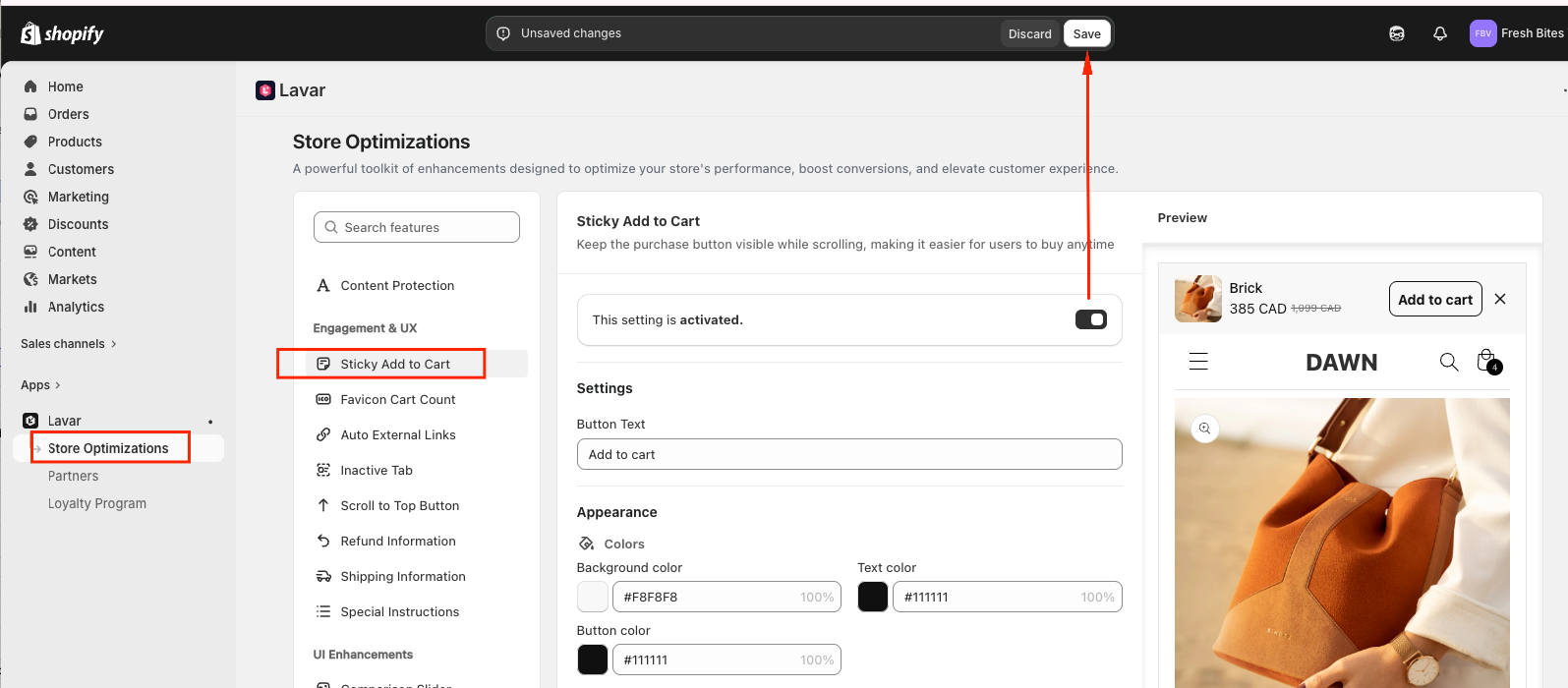
Step 3: Configure the Sticky Add to Cart Settings
In the Settings section: Customize the Button Text (e.g., “Add to Cart”, “Buy Now”, etc.).
In the Appearance section: Apply custom colors to match your store design.
If you need further assistance, please feel free to contact us at [email protected].